
With PV surplus prioritization you decide the order in which your solar surplus (photovoltaic power) is used. You define whether your battery, your charging station or your heating rod receives power from your PV system first, simply by drag and drop in the neoom App. This feature is included in the Mega and Giga pricing plans.
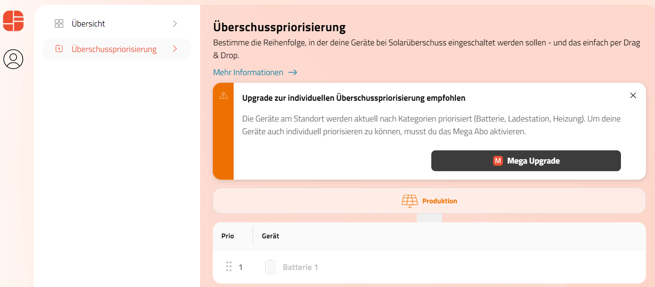
In the Free pricing plan, devices are ranked by category using the default prioritization: battery storage > charging station(s) > heating
Before you start
To prioritize your consumers individually, the following conditions must be met:
- Pricing plan Mega or Giga (pricing plans)
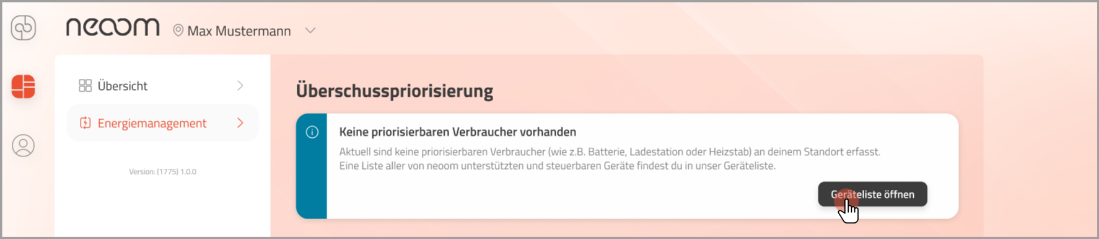
- You need consumers that can be prioritized (such as a battery, charging station or heating rod) at your site. You can find a list of all devices supported by neoom here
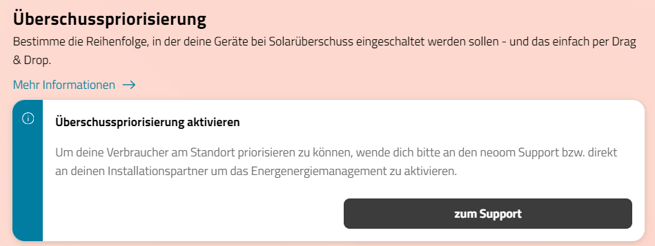
- The option "Surplus optimization enabled" must be active in your site configuration. Please contact either your electrician or our support for this. Here you can find the guide to activating energy and charging management.
Individual surplus prioritization
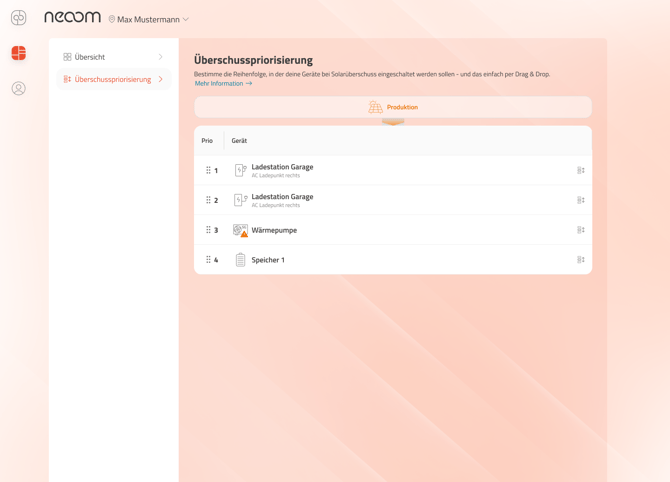
You can open "Surplus prioritization" from the menu in the "Surplus prioritization" tab. There you get an overview of the devices that are currently supplied with your solar surplus. Devices that are not supplied with solar surplus are not shown in surplus prioritization. You can move your devices to any position, as often as you like, by drag and drop or with the icon on the right.
The change in device order is saved in the app immediately. The loading icon disappears as soon as your new settings have also been applied on your BEAAM. This usually takes only a few seconds.
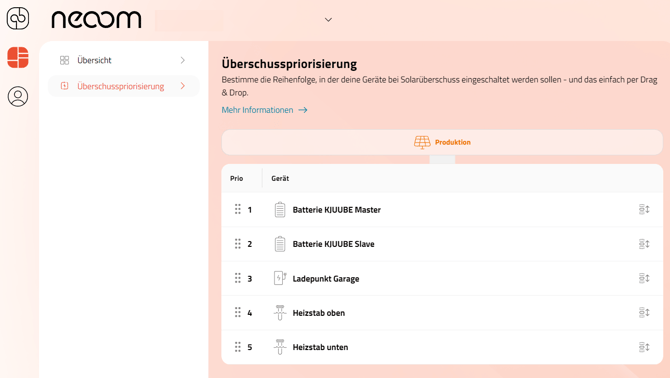
The devices are then supplied with surplus in the order of the list. If there is not enough surplus to supply all devices in the list, the higher-priority devices are supplied first, with as close to their maximum power as possible.
If your charging station does not receive enough power from your PV system (your surplus is 2 kW < minimum charging power of the charging station of 4.14 kW), the consumer in the 2nd or next position receives this surplus, e.g. your battery.
You can also remove charging stations from the list of surplus-prioritized devices at any time. To do this, go to the live view and tap the arrow next to your charging station.
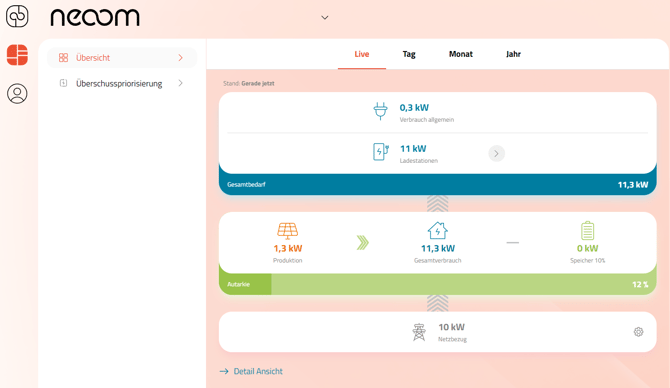
This takes you to the detail page of your charging station, where you can choose between the charging strategies. Currently your electric vehicle can be charged with "Solar" or "Fast".
With "Solar", your car is charged only with your solar surplus, in the prioritization you have set. "Fast" means you charge your electric vehicle with the highest possible power: in addition to solar surplus, your battery storage (if enabled) and grid power can be used for fast charging.
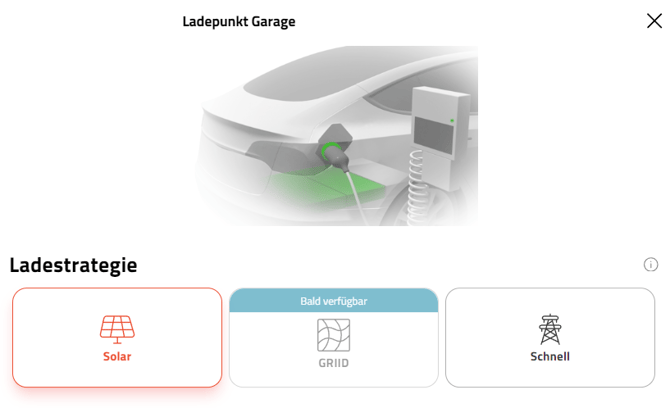
Devices excluded from prioritization are always operated with the power they require, regardless of your surplus solar power. This corresponds to a fast charging function. Both grid power and your self-generated PV power can be used for such consumers.
How you benefit from surplus prioritization
Here are some of the many ways you can use this function in your daily life:
Charging your EV with solar power
Imagine you want to make sure your car is optimally charged for the next day, using only the solar power you generate yourself. To do this, select the "Solar" option on the detail page of your charging station in neoom Ai and give it the highest priority by moving the charging station to the top position. This ensures your car is charged with the available solar power first, before your energy storage is filled, for example.
Using your battery at night
If you only need your car fully charged again in a few days, but want to make sure your energy storage is full in the evening to cover your energy needs overnight, set the battery to priority 1 and the charging station to priority 2 in neoom Ai. Your energy storage is then charged with solar power first. If there is still surplus solar power afterwards, it is used to charge your car.
Fast charging your EV
To make sure your car is fully charged by the next morning (e.g. for a long trip), select "Fast" on the detail page of your charging station. Grid power can then also be used.
Possible issues with prioritization
While a priority change is being applied, one or more devices may become unavailable.
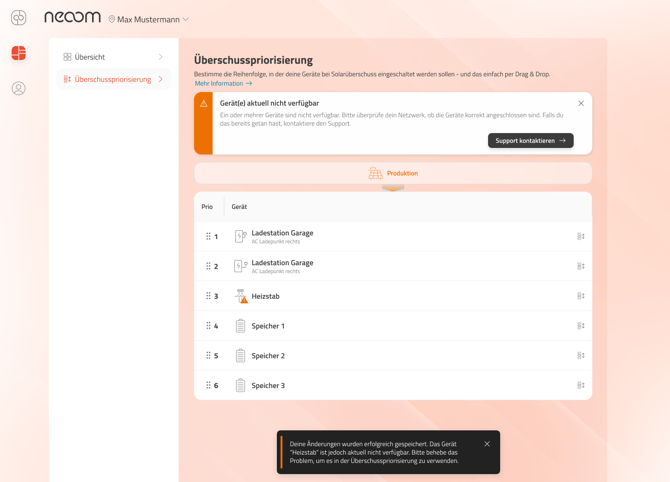
Your changes are saved in the app, but the change for the affected device is only applied once it is available again. In this case, please check the network connection of your devices. If you have already done so, please contact our support.
In many cases it helps to check the connection between the affected consumer and the BEAAM.
In many cases it helps to check the connection between the affected consumer and the BEAAM.
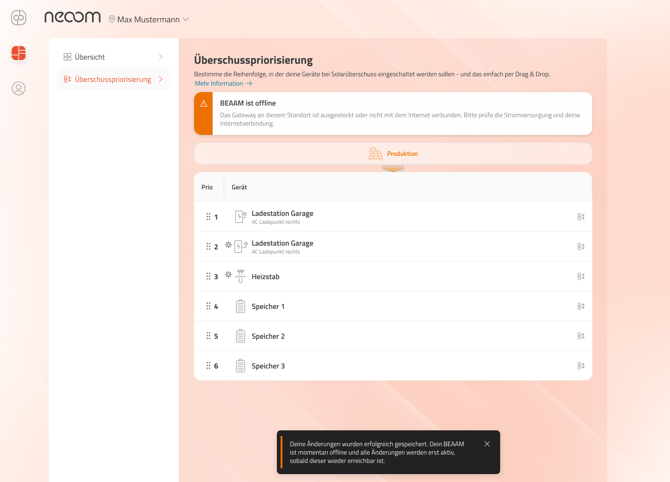
If communication with your BEAAM is interrupted, we still save your changes in the app in the order you have set. The changes are applied on the BEAAM as soon as the connection has been restored.
Prioritizing your SG Ready heat pump
With surplus prioritization in neoom Ai, you can include your Smart Grid Ready heat pump with an installed energy meter in your PV power supply. Set the position at which your heat pump is supplied with your self-generated solar power.
With the SG Ready function, we send your heat pump a signal whenever you have surplus PV power. Your heat pump then decides for itself whether it needs power to reach the temperature you have set.
Even without an energy meter installed on your heat pump, we can supply it with your PV surplus, but you cannot change its position in that case.
Your system partner can find the guide on how to add an energy meter here.
Errors when prioritizing your heat pump
Your heat pump may not have been fully configured. In this case the app shows the following notice, including a link to further instructions. With these, and with the help of your installer or electrician, you can make sure your heat pump is soon supplied with your self-generated solar power.
More on related topics in these articles:
➜ Energy and charging management: learn how neoom Ai optimizes your charging with dynamic control, PV surplus use and flexible charging strategies.
➜ Heating rods: surplus optimization: learn how to use surplus PV energy for hot water with neoom Ai and increase your self-consumption.
➜ Integrating an SG Ready heat pump: learn how to integrate your heat pump into neoom Ai via the BEAAM Extension and use PV surplus intelligently.
➜ Time-controlled feed-in prioritization: learn how to prioritize feeding PV surplus into the grid during set time windows and avoid curtailment losses.